 HF Panel
Reading mail
Open, flag, move and delete messages in HF Mail, handle spam, show pictures safely and download attachments.
The message list shows the mail in the folder you pick in the side menu, newest first. Click a message to read it.
Where: HF Mail › Folders (side menu)
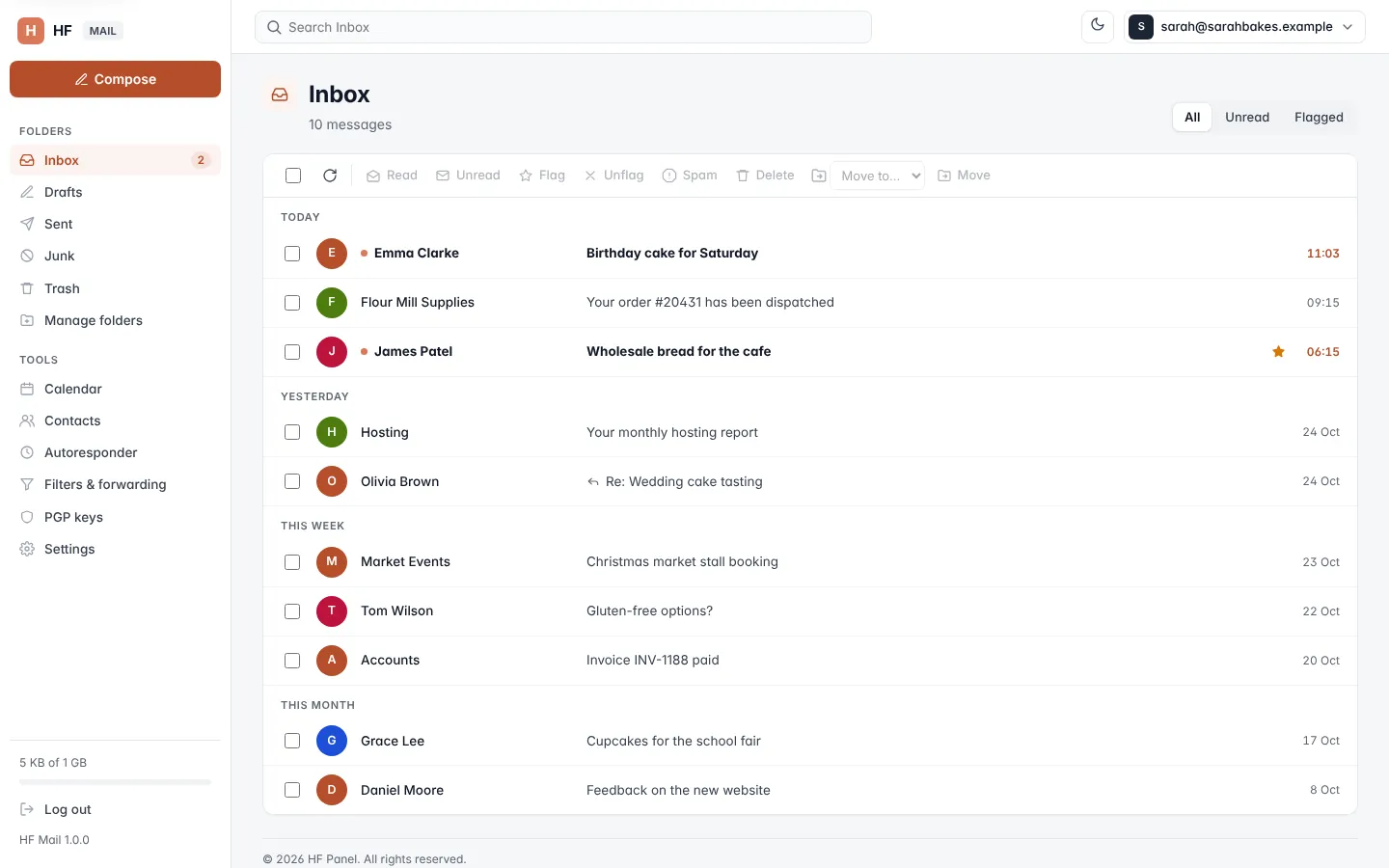
The message list
Each row shows the sender (or, in Sent and Drafts, the recipient), the subject and the date. Unread messages are in bold, a star marks flagged messages and an arrow marks messages you have replied to. Messages are grouped by date (Today, Yesterday, This week, This month and Earlier).
Above the list, choose what to show:
| Tab | Shows |
|---|---|
| All | every message in the folder |
| Unread | unread messages only |
| Flagged | flagged messages only |
The number of messages per page is set in Settings (25, 50, 100 or 200). Use ← Newer and Older → under the list to move between pages.
Unread counts in the side menu, and in the browser tab's title, update every minute. Click the refresh button above the list to reload it at once.
Act on several messages
- Tick the box in front of each message, or the box at the top to select every message on the page.
- Click an action in the toolbar.
| Button | What it does |
|---|---|
| Read / Unread | marks the messages read or unread |
| Flag / Unflag | adds or removes the star |
| Spam | moves the messages to Junk |
| Not spam | (in Junk) moves the messages back to the Inbox |
| Delete | moves the messages to Trash |
| Delete for good | (in Trash and Junk) deletes the messages permanently |
| Move to… then Move | moves the messages to the folder you choose |
In Trash and Junk an Empty Trash (or Empty Junk) button deletes every message in the folder for good, after you confirm.
Warning: Delete for good and Empty cannot be undone.
Read a message
Click a message to open it. Drafts open in the editor instead, so you can carry on writing.
At the top of an open message:
| Control | What it does |
|---|---|
| back button (folder name) | returns to the list |
| Delete | moves the message to Trash (in Trash and Junk: Delete for good) |
| Spam / Not spam | moves the message to Junk, or back to the Inbox |
| Mark unread | marks it unread again and returns to the list |
| Move to… / Move | moves the message to another folder |
| More › View source | shows the full raw message in a new tab |
| More › Download (.eml) | saves the message as an .eml file |
| More › Print | prints the message |
| up and down arrows | open the newer or older message in the folder |
After you delete, move or mark a message as spam, the next message opens.
To answer, click Reply, Reply all (shown when the message has more than one recipient) or Forward, at the top right of the message or under it. See Writing mail.
If the sender is not yet in your contacts, click + Add to contacts next to their name.
Spam warnings
A message that the spam filter scored as spam shows a warning with its score: This message was marked as spam (score 6.5). Be careful with links and attachments. Messages that score high enough are delivered to Junk; the level is set for all mailboxes in the Control Panel.
Pictures from the internet
Pictures that load from the internet are hidden at first, because senders can use them to see when you read a message. When a message has such pictures, a notice appears above it:
- Show pictures shows them for this message only.
- Always show from address shows them from that sender from now on.
You can choose to always show pictures, and manage the list of trusted senders, in Settings.
Note: messages are shown in a protected frame. Scripts in a message never run.
Attachments
Attachments are listed under the message with their size. Click the download button to save one. Files a browser can show safely (such as pictures and PDFs) also have an open button, which shows them in a new tab.
Invitations
A message with a calendar invitation shows the event (what, when, where, organizer and attendees) above the text. See Calendar for how to answer it.
Encrypted and signed messages
A PGP-encrypted message is decrypted in your browser when you have your PGP key set up. A signed message shows whether the signature is good. See PGP keys.