 HF Panel
Activity log
See every change made in the panel, who made it, from which IP address, and search the log.
The Activity log records every change made in the panel by anyone: administrators, resellers, customers and the panel's own background jobs. For each change it shows who made it, what they did and from which IP address. Entries are kept for a year.
Where: Server Admin › Security › Activity log
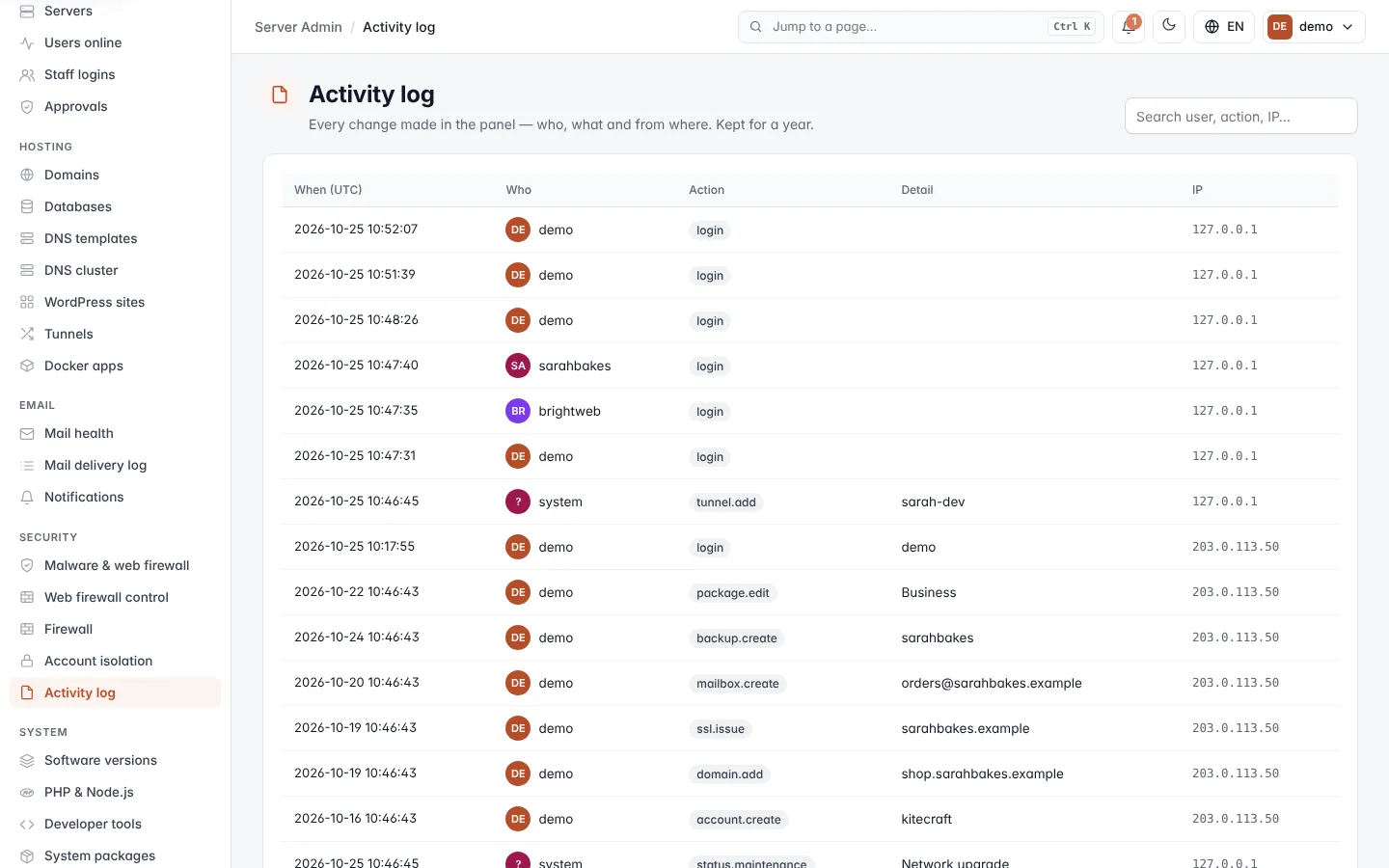
Read the log
The newest 500 entries are shown, newest first.
| Column | What it shows |
|---|---|
| When (UTC) | When the change was made, in UTC. |
| Who | The login that made it. system means the panel itself, for example a background job. |
| Action | What was done, as a short code such as domain.add, firewall.block or mail.limit. |
| Detail | What it was done to, for example the domain name or IP address. |
| IP | The IP address the change came from. |
Search the log
- Type in the search box at the top right (Search user, action, IP…).
- Press Enter.
The search matches the username, action, detail or IP address, and also finds partial matches. For example, dns.
finds every DNS change and sarahbakes finds everything done by or to that account. Clear the box and press Enter to
see everything again.
Note: the log is read-only. Nothing can be changed or deleted from this screen.