 HF Panel
Components
Install, update and choose versions of Apache, PHP, MariaDB, Nginx, Node.js, Redis, PostgreSQL, phpMyAdmin and Composer in HF Server.
The Components page installs the servers and tools HF Server runs, keeps them up to date and lets you pick their versions.
Where: HF Server › Components
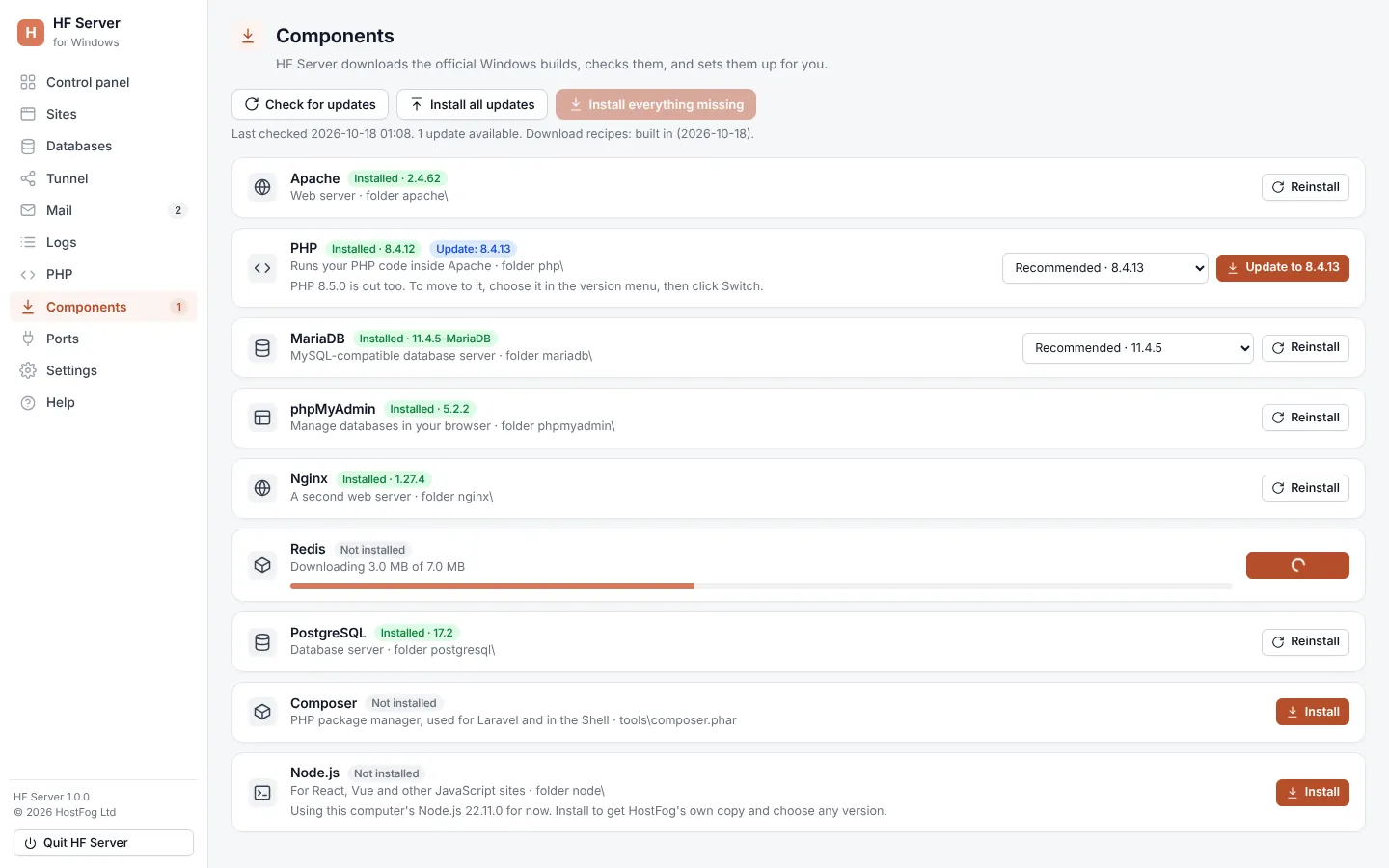
The components
| Component | What it is |
|---|---|
| Apache | web server |
| Nginx | second web server with its own port; runs PHP through php-cgi (optional) |
| Node.js | runs React, Next.js, Vue and other JavaScript projects (optional) |
| PHP | runs your PHP code |
| MariaDB | MySQL-compatible database server |
| Redis | cache and queues for Laravel, WordPress and Node apps (optional) |
| PostgreSQL | second database server (optional) |
| phpMyAdmin | manage MySQL databases in your browser |
| Composer | PHP package manager, used for Laravel and in the Shell |
Each row shows Installed with the version, or Not installed, and an available update.
Install
- Install everything missing installs every component that isn't optional and isn't installed yet.
- To install one component, choose a version in its menu (Recommended is the default) and click Install.
A progress bar shows the download. Every download is checked against a checksum before it is used.
| System | Where the servers come from |
|---|---|
| Windows | the official Windows builds, downloaded into the HostFog folder |
| macOS | Homebrew (brew install httpd php mariadb); HF Server runs its own copies with your sites and databases in the HostFog folder, so Homebrew's own settings don't change |
| Linux | your system's packages (it asks for your password once); HF Server then switches off the system's own Apache and MariaDB services |
phpMyAdmin is always downloaded into the HostFog folder.
Tip: on Windows, if a download fails, download the zip yourself and put it in the
downloadsfolder, then click Install again. HF Server uses a matching zip from there first.
Choose a version
Open a component's version menu to see every version its download site offers. Choose one and click Install version, Switch to version or Reinstall version. Your settings files are kept.
On Windows, Settings also has PHP version and MariaDB version choices: Automatic (recommended) follows HostFog's recommendation and stays on your current series while it gets updates.
Updates
HF Server looks for new versions once a day (Apache, PHP, MariaDB, phpMyAdmin, the tools and HF Server itself). The line under the buttons says when it last checked and how many updates are available.
| Button | What it does |
|---|---|
| Check for updates | checks now |
| Install all updates | installs every available update; servers being updated need to be stopped first |
| Update to version | updates one component |
Bug-fix and security updates in the same series (like PHP 8.4.26 → 8.4.27) install by themselves while that server is stopped, unless you turn this off in Settings. Bigger upgrades are never made without you.