 HF Panel
Packages
Create the hosting plans you sell — disk, files, domains, mailboxes, databases, CPU, memory, price and trial — and enforce CPU and memory limits.
Packages are the hosting plans you sell. Each package sets an account's limits — disk, files, domains, mailboxes, databases and more — its CPU and memory limits, its monthly price and its feature list. Every account is on one package. A limit of 0 means unlimited, unless the field says otherwise.
Where: Server Admin › Accounts › Packages (on the official edition: the Packages tab of Server Admin › Business)
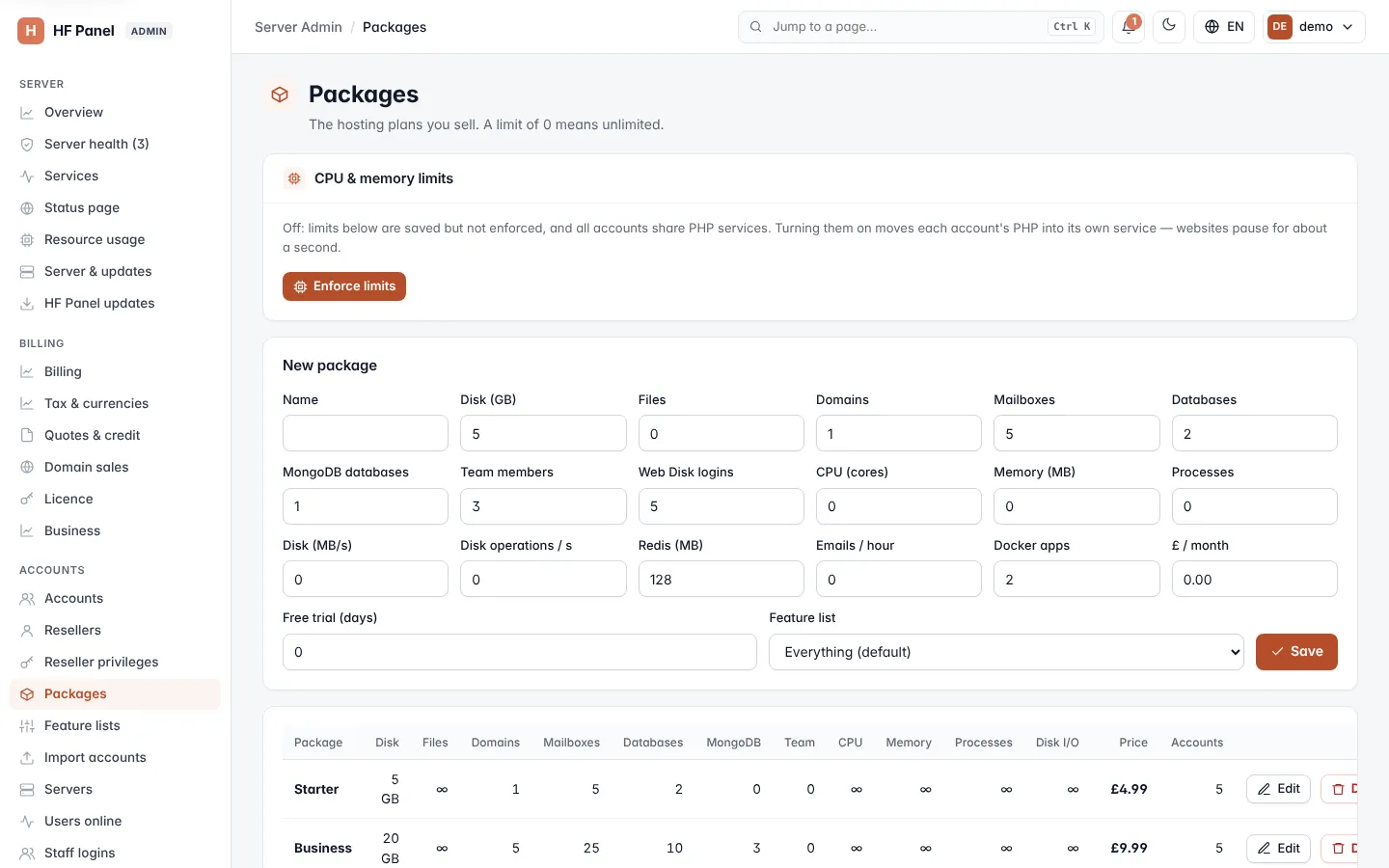
Create a package
-
Fill in New package:
Field What it does Name Up to 40 characters; must be unique. Disk (GB) Disk quota. Files Most files and folders (inodes) the account may have, email included. Domains Most domains. Mailboxes Most mailboxes. Databases Most MySQL databases. MongoDB databases Most MongoDB databases (up to 1,000); 0 = none. Team members (0 = unlimited) People a customer may invite to their Control Panel (up to 100); 0 = unlimited, -1 = none. Web Disk logins Network drive logins a customer may make (up to 1,000); 0 = none. Scheduled dumps (0 = unlimited) Databases a customer may dump on a schedule (up to 1000); 0 = unlimited. A package without a value allows 5. See Database tools. Git previews (0 = unlimited) Preview websites of Git branches a customer may have at once (up to 100); 0 = unlimited. A package without a value allows 3. See Deploys & previews. Site checks On or Off: whether the package's accounts get scheduled site checks (on by default). Off stops the checks; the results already stored stay. CPU (cores, 0 = unlimited) CPU limit, for example 1.5(one and a half cores); at least 0.1.Memory (MB, 0 = unlimited) Memory limit; at least 128. The account is slowed down at 90% of it and processes are stopped at 100%. Processes (0 = unlimited) Most processes at once; at least 20. Disk speed (MB/s, 0 = unlimited) Fastest the account may read and write its disk, each; 5 to 10,000. Disk operations (IOPS, 0 = unlimited) Most disk reads and writes per second; at least 100. PHP workers (0 = unlimited) Most PHP processes each website pool of the account runs at once (1 to 500). App processes (0 = unlimited) Most processes each Node.js, Python or Ruby app may run; at least 5. Redis memory (MB, 0 = off) Largest Redis cache a customer may turn on (16 to 8,192); 0 = no Redis. Emails / hour Most recipients per hour; 0 = the server default. Docker apps One-click apps such as n8n or Nextcloud (up to 50); 0 = none. £ / month The monthly price. 0 = free. Free trial (days) For online orders: days free before the first payment (up to 90); 0 = no trial. Feature list Which tools customers on this package get. Everything (default) gives every tool. -
Click Save.
New packages start with 5 GB of disk, 1 domain, 5 mailboxes, 2 databases, 1 MongoDB database, 3 team members, 5 Web Disk logins, 128 MB of Redis and 2 Docker apps; change these as you need.
Note: with Stripe billing on, a paid package is made sellable in Stripe when you save it. PayPal needs nothing here: its plan is made at the next PayPal order.
Change a package
- Click Edit on the package's row. The form at the top becomes Edit ….
- Change the values.
- Click Save, or Cancel to leave it as it was.
Changes apply at once to every account on the package: their disk quota and limits are updated straight away.
Delete a package
Click Delete on the package's row and confirm. You can only delete a package no account uses; move its accounts to another package first under Accounts.
Enforce CPU and memory limits
The CPU, memory, process and disk speed limits are saved with each package, but they only hold accounts back once you enforce them.
- In CPU & memory limits, click Enforce limits.
- Confirm Enforce CPU and memory limits for every account now?.
Each account then runs in its own limited slice: its PHP, Node.js apps, SSH/SFTP and cron jobs together cannot use more CPU, memory or processes than its package allows. The card shows ● Enforced. This applies on every joined server too.
Warning: turning limits on moves each account's PHP into its own service; websites pause for about a second.
To stop, click Turn off limits and confirm. Websites move back to the shared PHP services within a minute.
How the limits are enforced, how to give one account other limits and where to watch usage is on Resource limits.
The package list
The table shows every package with its Disk, Files, Domains, Mailboxes, Databases, MongoDB, Team, CPU, Memory, Processes, Disk I/O, Price and the number of Accounts on it.
Note: resellers can see the packages but not change them.