 HF Panel
HF Files
Sign in to HF Files, the file manager of HF Panel, and find your way around its places, folders and toolbar.
HF Files is the file manager of HF Panel. It shows the files of your hosting account and runs every change as your account's own user, inside your home folder only.
Where: https://files.yourdomain.com, or Control Panel › Files › File Manager
Open HF Files
From the Control Panel: click File Manager in the menu. HF Files opens in a new tab, already signed in. The link works once; if you see That link has expired. Open the File Manager from your Control Panel again., open it from the Control Panel again.
Directly:
- Open the HF Files address.
- Enter the Username and Password of your hosting account.
- Click Sign in.
If your account uses two-factor login, type the 6-digit Code from your authenticator app (or a backup code) and click Continue. Cancel and sign out goes back.
The sign-in page lists the available languages; click one to switch. Forgotten your password? opens the Control Panel's password reset.
Note: a session ends after 2 hours without use, and after 12 hours at most. Changing your account's password ends every open session.
Places
The side menu has the main places of your account:
| Place | Folder | What it holds |
|---|---|---|
| Home folder | / |
everything in your account |
| Websites | /web |
one folder per website; each website is also listed under it |
| Logs | /logs |
your websites' log files |
| Temporary files | /tmp |
your account's temporary files |
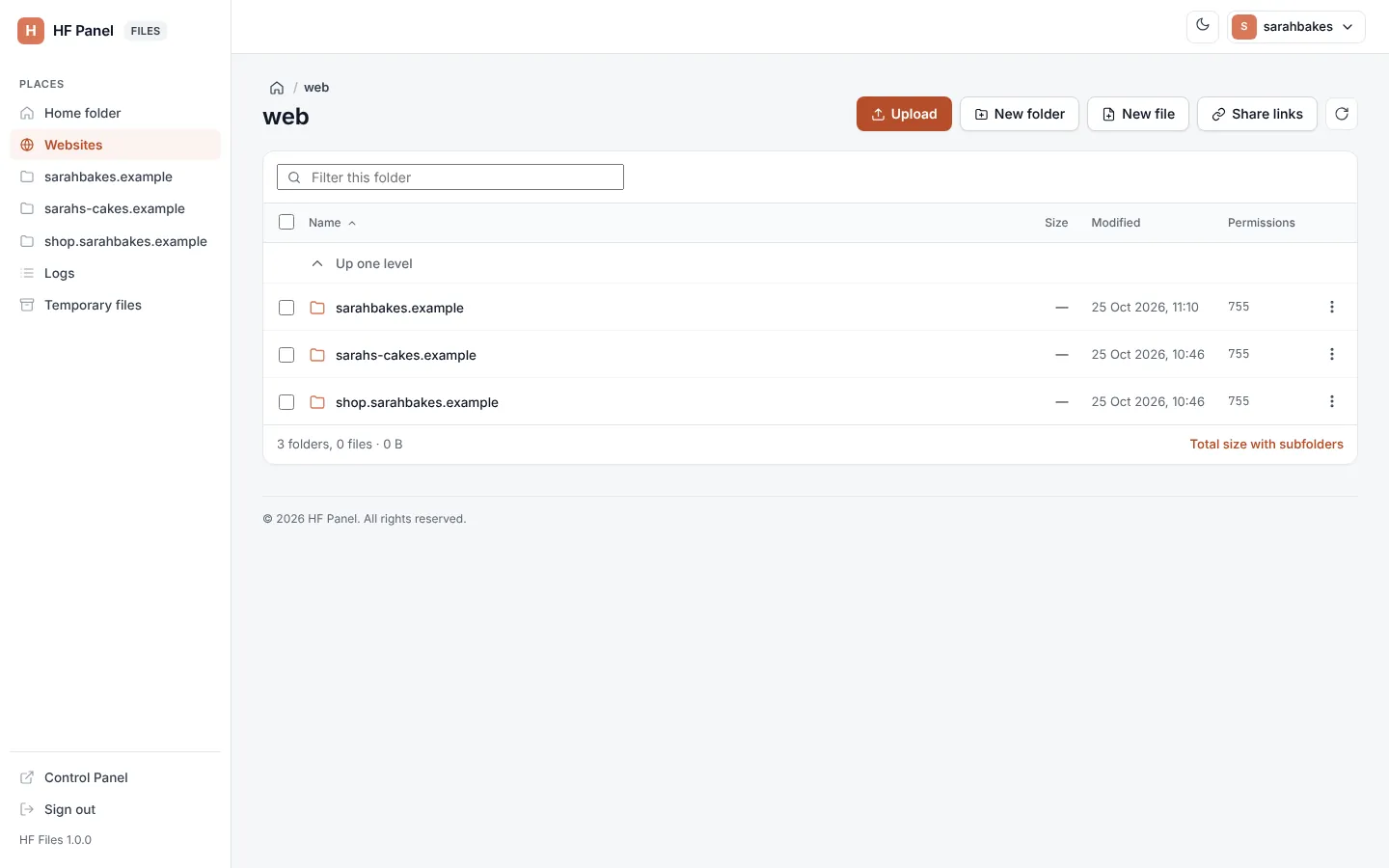
A plain visit opens Websites. The path at the top (breadcrumbs) shows where you are; click any part of it to go back up. Up one level at the top of the list does the same.
The folder view
Each entry shows its Name, Size, Modified date and Permissions. Click a column heading to sort by it; click again to reverse. Folders come first.
| Click on | Opens |
|---|---|
| a folder | the folder |
| a text or code file | the editor |
| a picture | a preview, with Download |
The toolbar has Upload, New folder, New file, Share links and a refresh button. Type in Filter this folder to show only the entries whose names match.
Under the list, HF Files shows how many folders and files there are and their size. Click Total size with subfolders to count everything in the folder.
Note: a folder with more than 5,000 entries shows the first 5,000. The rest can be reached over SFTP.
Your account menu
Your username at the top right opens Control Panel, Password & security (both in the Control Panel) and Sign out. The moon and sun button switches between the light and dark look.
When your hosting provider or a team member opens HF Files for you, a notice at the top says so: You are looking at the files of sarahbakes as …. Changes are recorded with your name.