 HF Panel
Software versions
See which version of each server program runs, and switch, install or update Nginx, Apache, MariaDB, PostgreSQL, FerretDB, Redis and Node.js.
The Software versions screen shows the version of each server program and every version its official source publishes for your server's operating system release. You can move a program to another version, or update it to the newest release of the version it runs. Changes take a few minutes, and you can watch them as they run.
Where: Server Admin › System › Software versions
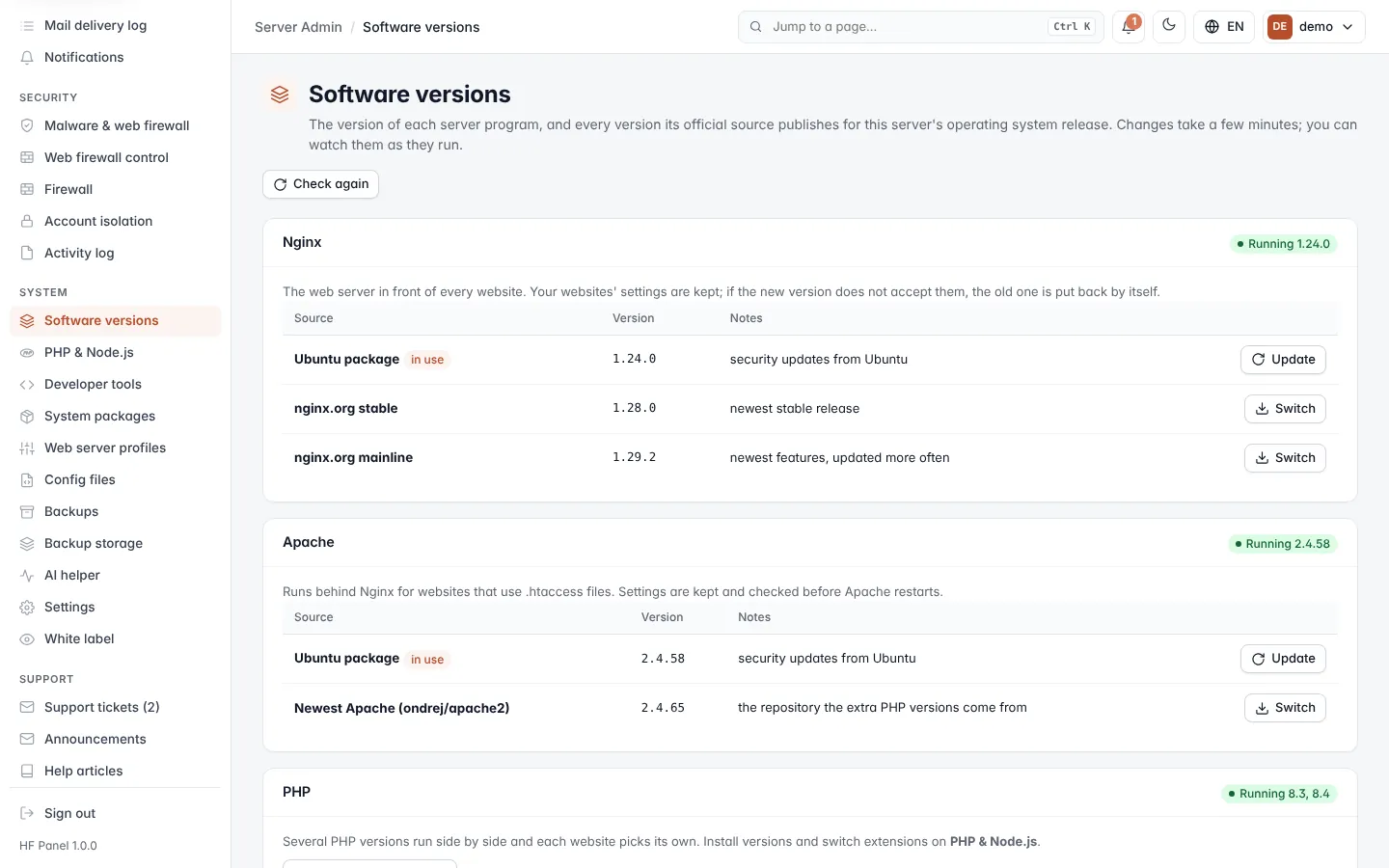
Read the programs
Each program has its own card. The label next to its name shows Running version (several versions for programs that run side by side) or Not installed.
| Program | What changing its version does |
|---|---|
| Nginx | The web server in front of every website. Websites' settings are kept. If the new version does not accept them, the old one is put back by itself. |
| Apache | Runs behind Nginx for websites that use .htaccess files. Settings are kept and checked before Apache restarts. |
| PHP | Managed on its own screen. Click Manage PHP versions to open PHP & Node.js. |
| MariaDB | MySQL-compatible databases. Every database is saved to a file first. You can only move up: a newer MariaDB writes data an older one cannot read. |
| PostgreSQL | Several versions can be installed side by side. Choosing a newer one saves every database first, then moves them across. The old version is stopped and kept. |
| FerretDB (MongoDB) | Serves customers' MongoDB databases (MongoDB drivers and mongosh work), keeping the data in the server's PostgreSQL. Pinned releases, checksum verified. Every MongoDB database is saved before a switch. |
| Redis | The object cache for websites (each customer gets their own). You can only move up. |
| Node.js | Official builds from nodejs.org, checksum verified. Versions are installed side by side, and each Node.js app picks its own. |
Each card lists the versions on offer:
| Column | What it shows |
|---|---|
| Source | Where the version comes from, for example the operating system's own package or the program's official repository. in use marks the one running now. |
| Version | The exact version, or — when it is not known. |
| Notes | For example LTS, or end of life in amber. |
Change a program's version
- Find the program's card and the version you want.
- Click the button on that row:
- Switch moves the program to that version (Nginx, Apache, MariaDB, FerretDB, Redis).
- Install adds that version next to the others (PostgreSQL and Node.js).
- Update installs the newest release of the version in use.
- Confirm. The change opens in a progress window you can follow live.
Warning: moving MariaDB to a newer version cannot be undone. Every database is saved to a file first, and websites pause for a few seconds during the move.
Tip: change versions at a quiet time. Websites keep working, but a restart of the web server or database server can interrupt requests that are running.
Refresh the version lists
The lists of versions on offer are kept for a while. Click Check again at the top to ask the official sources for their lists again. If a card says the version list could not be read, click Check again.