 HF Panel
Logs
Read your website's errors explained in plain words, the access, web server and PHP error logs, and download the raw log files.
The Logs screen shows what happens on your websites: errors explained in plain words, the visitors' access log, the web server and PHP error logs, and the raw log files to download. Logs show the newest 300 lines, newest first, and are kept for 14 days.
Where: Control Panel › Websites › Logs
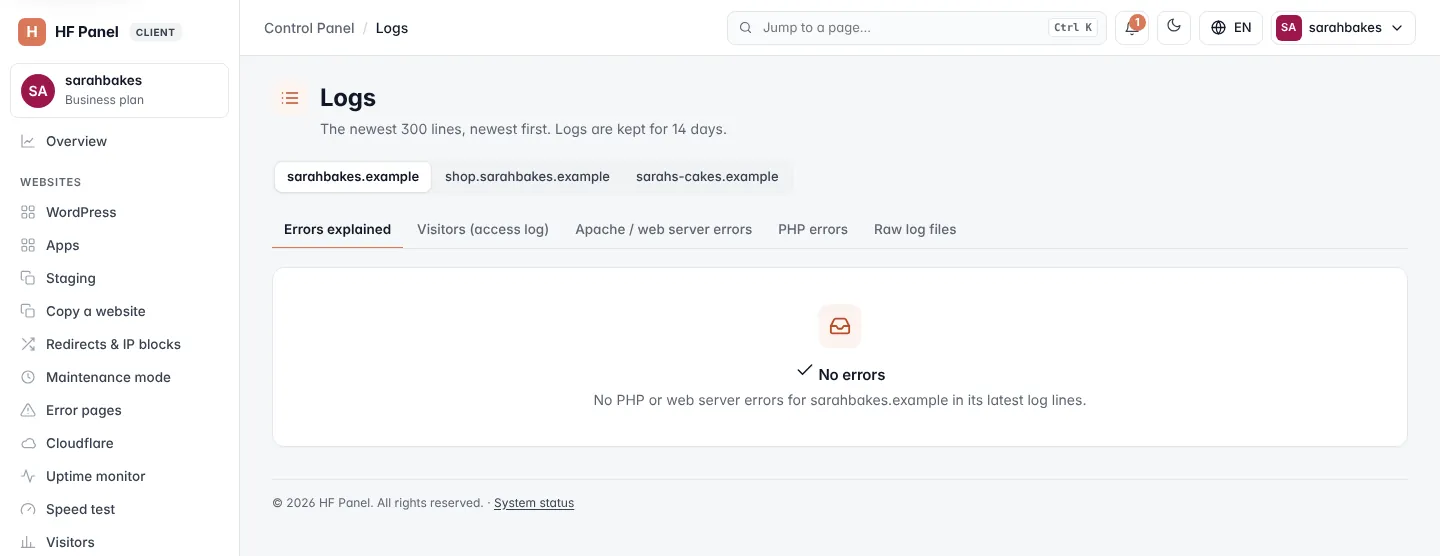
Choose a website and a log
- Click the website in the picker at the top.
- Click a tab:
| Tab | What it shows |
|---|---|
| Errors explained | the website's PHP and web server errors, grouped and explained (the default) |
| Visitors (access log) | every request to the website: who, when, which page and the answer |
| Apache / web server errors | the web server's error log for the website |
| PHP errors | the PHP error log of your account (all websites together) |
| Raw log files | the full log files in your logs folder |
In the log tabs, lines with errors are marked red and lines with warnings or notices amber. When a log does not exist yet, the screen says "No log yet — it appears after the first visit."
Errors explained
Errors explained reads the newest lines of the PHP and web server error logs of the chosen website. The same error is shown once, with how often it happened and when it last happened. The most serious errors come first.
Each error card shows:
| Part | What it shows |
|---|---|
| Level | Breaks the page, Error, Warning, Notice or Old code (deprecated) |
| Title and count | what went wrong, for example "12× · last 24 Oct, 14:05 UTC" |
| Explanation | what the error means, in plain words |
| What to do: | how to fix it |
| The exact message | click to see the original log line, with the file and line number |
If your hosting provider has the AI helper switched on, click Ask the AI helper to have the error explained and get help fixing it.
When there are no errors, the screen says No errors.
Download a log
In the Visitors (access log), Apache / web server errors and PHP errors tabs, click Download (with the file size) at the top of the screen to download the whole log file.
Raw log files
Raw log files lists the full log files in your logs folder, with their Size and when they Changed. They
are in the standard combined format, so you can open them in any log analyser. Older days are compressed (.gz).
To download a file, click Download on its row.
Tip: you can also open the
logsfolder in the File Manager.
Related
- Visitors — the access log as charts
- Error pages
- PHP settings
- Resource usage