 HF Panel
Resellers
Create reseller logins, set their account limit and approval rule, reset passwords, suspend and delete resellers.
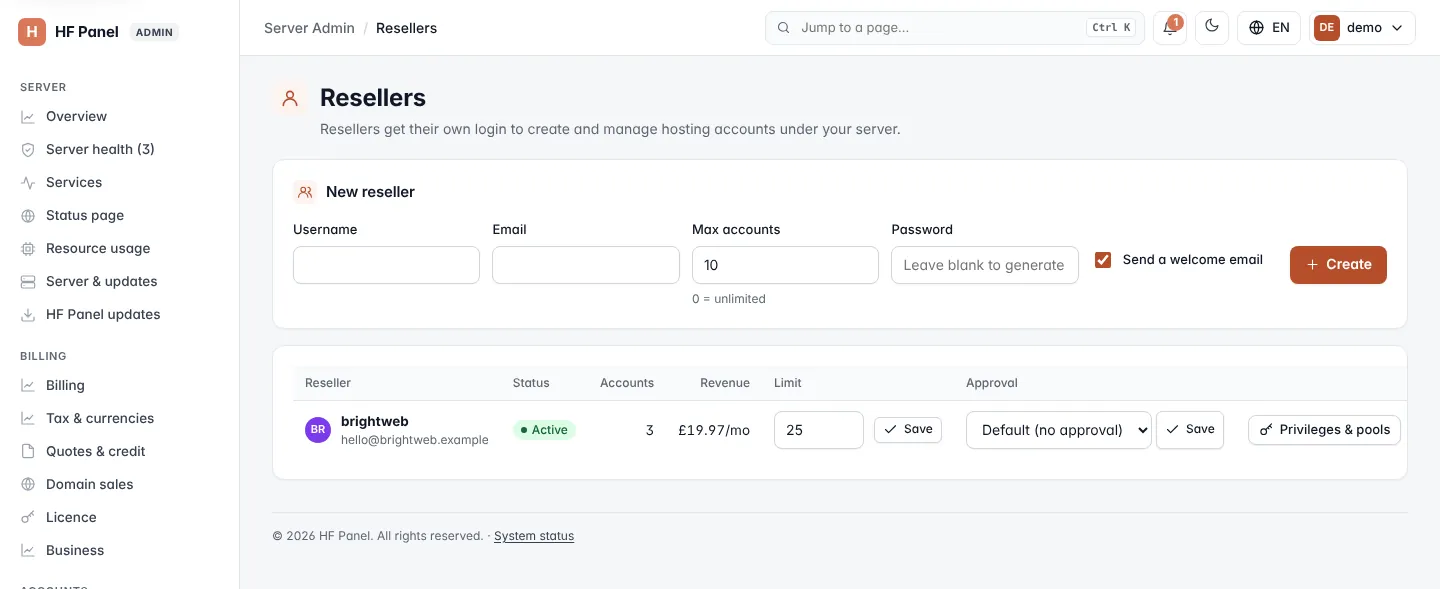
Resellers get their own login, the Reseller Panel, to create and manage hosting accounts under your server. The Resellers screen lists them with their customers and revenue, and is where you create, limit, suspend and remove them.
Where: Server Admin › Accounts › Resellers
Create a reseller
-
In New reseller, fill in the form:
Field What it does Username 3–16 lowercase letters and numbers, starting with a letter. System names such as rootoradmincannot be used.Email The reseller's email. Max accounts The most hosting accounts they may create; 0 = unlimited. Password Leave it blank to generate one. Send a welcome email Emails them their login details. -
Click Create.
The password is shown once at the top of the page. Copy it now.
The reseller list
| Column | What it shows |
|---|---|
| Reseller | Username and email. |
| Status | Active or Suspended. |
| Accounts | How many customer accounts they have. |
| Revenue | The monthly package prices of their active customers. |
| Limit | Their account limit. Change the number and click Save. |
| Approval | Whether their deletes need an administrator's approval. |
Decide whether a reseller's deletes need approval
Deleting a customer account or restoring a customer's whole backup can be made to wait for an administrator's approval.
- In the reseller's Approval column, choose:
- Default — follows the server-wide setting under Settings; the label says whether that means approval is needed.
- Needs approval
- No approval
- Click Save.
Requests that wait appear under Approvals.
Other actions
| Button | What it does |
|---|---|
| Privileges & pools | Opens Reseller privileges for this reseller. |
| Reset password | Makes a new password, shown once, and emails them a link to choose their own. |
| Suspend | Stops the reseller signing in. Their customers keep working. |
| Unsuspend | Lets a suspended reseller sign in again. |
| Delete | Removes the reseller after you confirm. Their customers move to you. |
Note: deleting a reseller may need a second step first, depending on Settings — see Approvals.