 HF Panel
Users online
See who is signed in to the panel right now and who was active earlier today, with the page they are on and their IP address.
Users online shows who is signed in to the panel right now — anyone active in the last 5 minutes — and who was active earlier today. The page refreshes itself every 30 seconds. It is read-only.
Where: Server Admin › Accounts › Users online
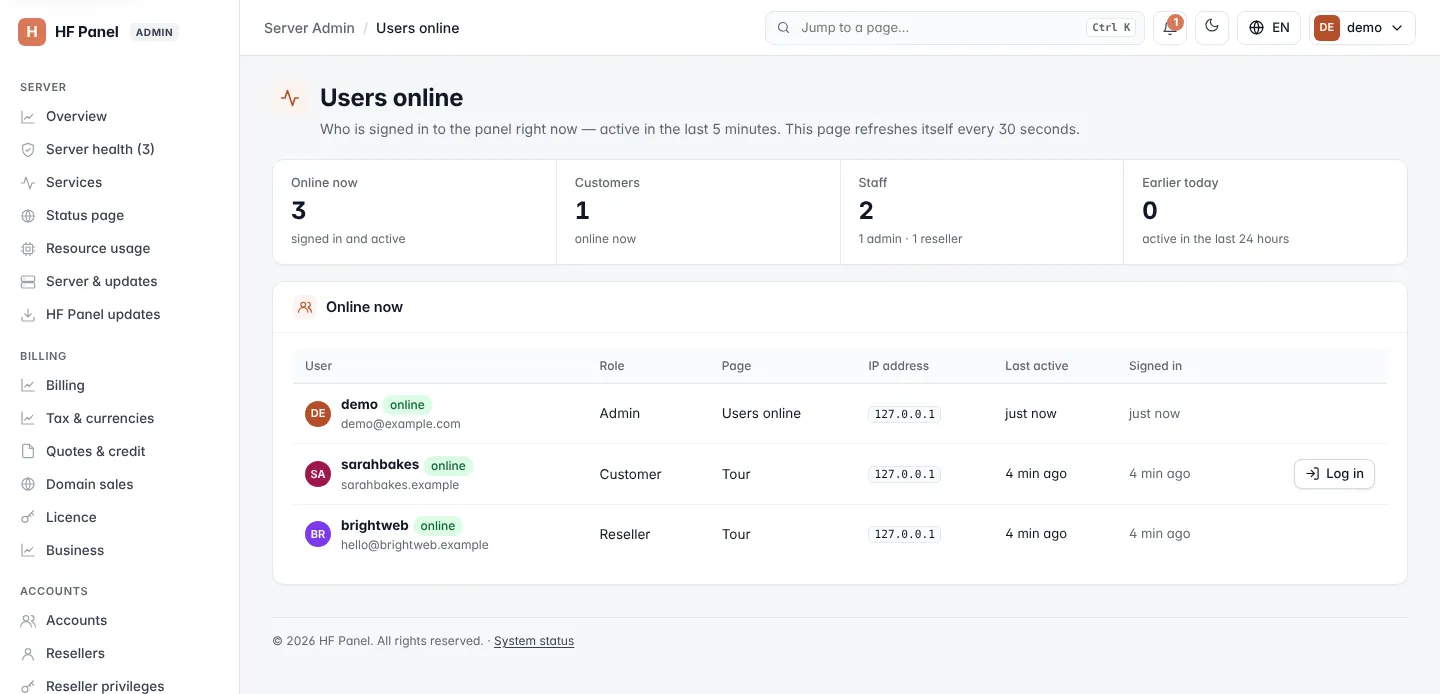
Figures
| Figure | What it shows |
|---|---|
| Online now | Everyone signed in and active. |
| Customers | Customers online now. |
| Staff | Administrators and resellers online now. |
| Earlier today | People active in the last 24 hours who are not online now. |
Online now
| Column | What it shows |
|---|---|
| User | Username and main domain (or email); suspended accounts are marked. |
| Role | Administrator, reseller or customer. |
| Page | The screen they are on. |
| IP address | Where they are connecting from. |
| Last active | How long ago they last did something. |
| Signed in | How long ago they signed in. |
For a customer, click Log in to open their Control Panel and see what they see.
Earlier today
The second table lists up to 50 people active in the last 24 hours who are no longer online, with their Last page, IP address, last activity and sign-in.
Note: resellers see this screen for themselves and their own customers only.