 HF Panel
Server health
Run every check of the server at once, fix common problems with one click, and get a weekly summary by email.
Server health checks everything that can quietly break a hosting server — stopped services, broken configuration, a full disk, an expiring panel certificate, a long mail queue and more — and shows the result in one place. Where a problem is safe to fix automatically, the check has a button that fixes it.
Where: Server Admin › Server › Server health
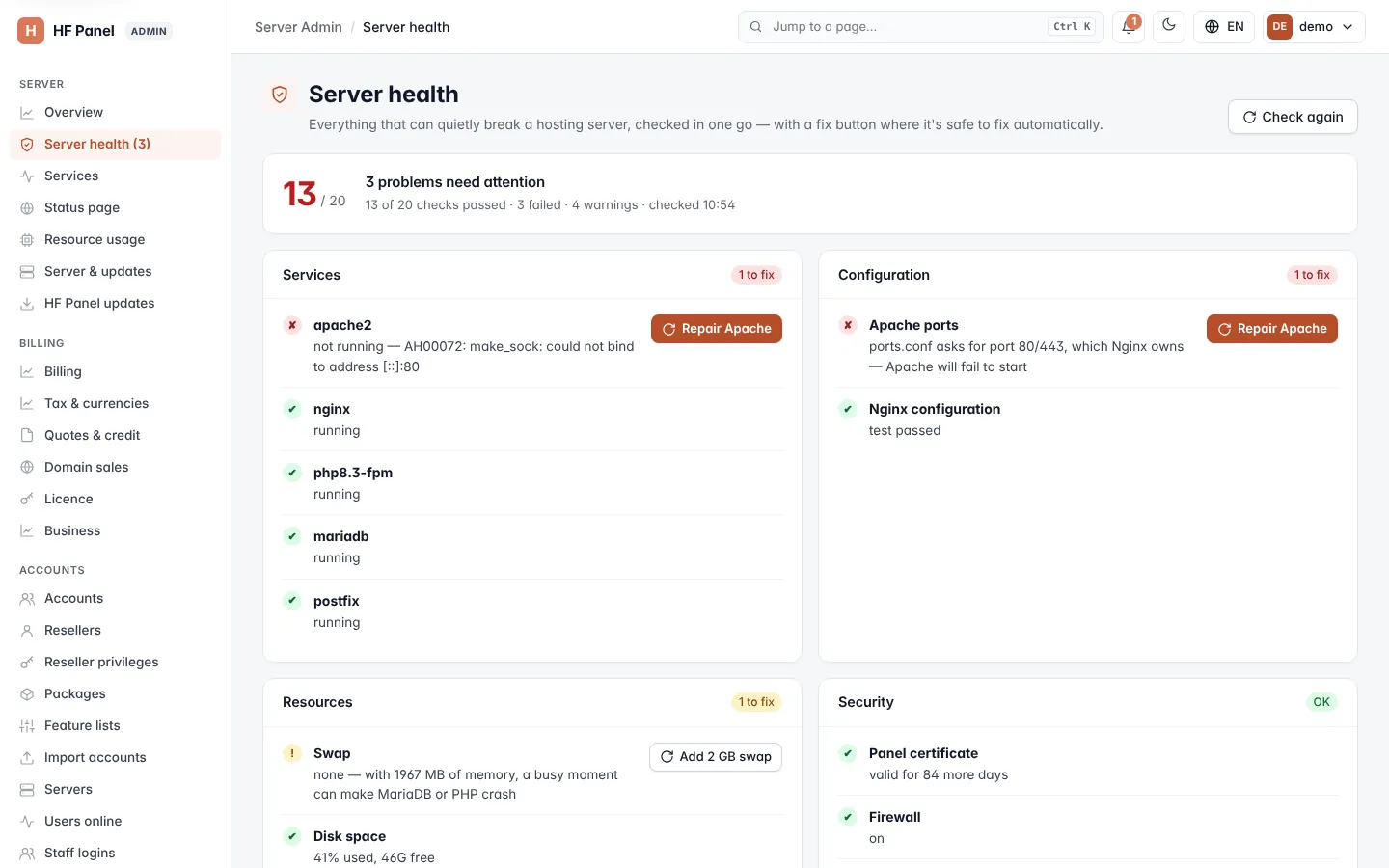
The checks run fresh every time you open the screen. When the last check found problems, the menu entry shows how many, for example Server health (2), and the Overview shows a warning.
Read the results
The summary card at the top shows how many checks passed out of the total, for example 27 / 29, with a heading:
- Everything looks healthy — every check passed.
- Running, with 2 things to look at — there are warnings but nothing has failed.
- 1 problem needs attention — at least one check failed.
Below it, one card per group lists its checks, the worst first. Each card is marked OK or with how many checks need fixing.
| Mark | Meaning |
|---|---|
| ✔ | The check passed. |
| ! | A warning: it works, but should be looked at. |
| ✘ | The check failed. |
The groups
| Group | Examples of what is checked |
|---|---|
| Services | Each server service is running, and the server agent answers. |
| Configuration | The Nginx and Apache configuration tests pass, and Apache does not ask for the ports Nginx uses. |
| Resources | Disk space, files (inodes), memory, swap and server load. |
| Security | The panel's certificate, the firewall, a restart needed after updates, and the clock. |
| The mail queue and blocklists. | |
| DNS | That every service name of your main domain points at this server; if not, which A records to add. |
| Updates & backups | Server updates, nightly backups and the backup restore test. |
Fix a problem
-
Find the check marked ✘ or !.
-
Click its button. The label says what it does, for example:
Button What it does Restart Restarts the stopped service. Repair Apache Repairs the Apache setup. Add 2 GB swap Adds a 2 GB swap file. Free up space Cleans up disk space. Retry delivery Tries to deliver the waiting mail again. Sync the clock Synchronises the server's clock. Get certificate Gets a certificate for the panel. -
A window shows the fix as it runs. When it is done, the checks run again.
Some checks have an Install button instead, which installs a missing part, or a link button that opens the screen where you deal with it.
Note: every fix is written to the Activity log.
Click Check again at the top to run all checks once more.
Get the weekly summary email
Every Monday morning the panel can send one email to your support address with what needs a look: SSL certificates, websites that were down, backups and restore tests, paused senders and the mail queue, accounts nearly full, overdue invoices and domain registrations ending.
- In Weekly summary, tick Send the weekly summary.
- Click Save.
To receive one straight away, click Send it now.
Important: the summary goes to the support email set under Settings. If none is set, Send it now says Set a support email in Settings first.