 HF Panel
Sites
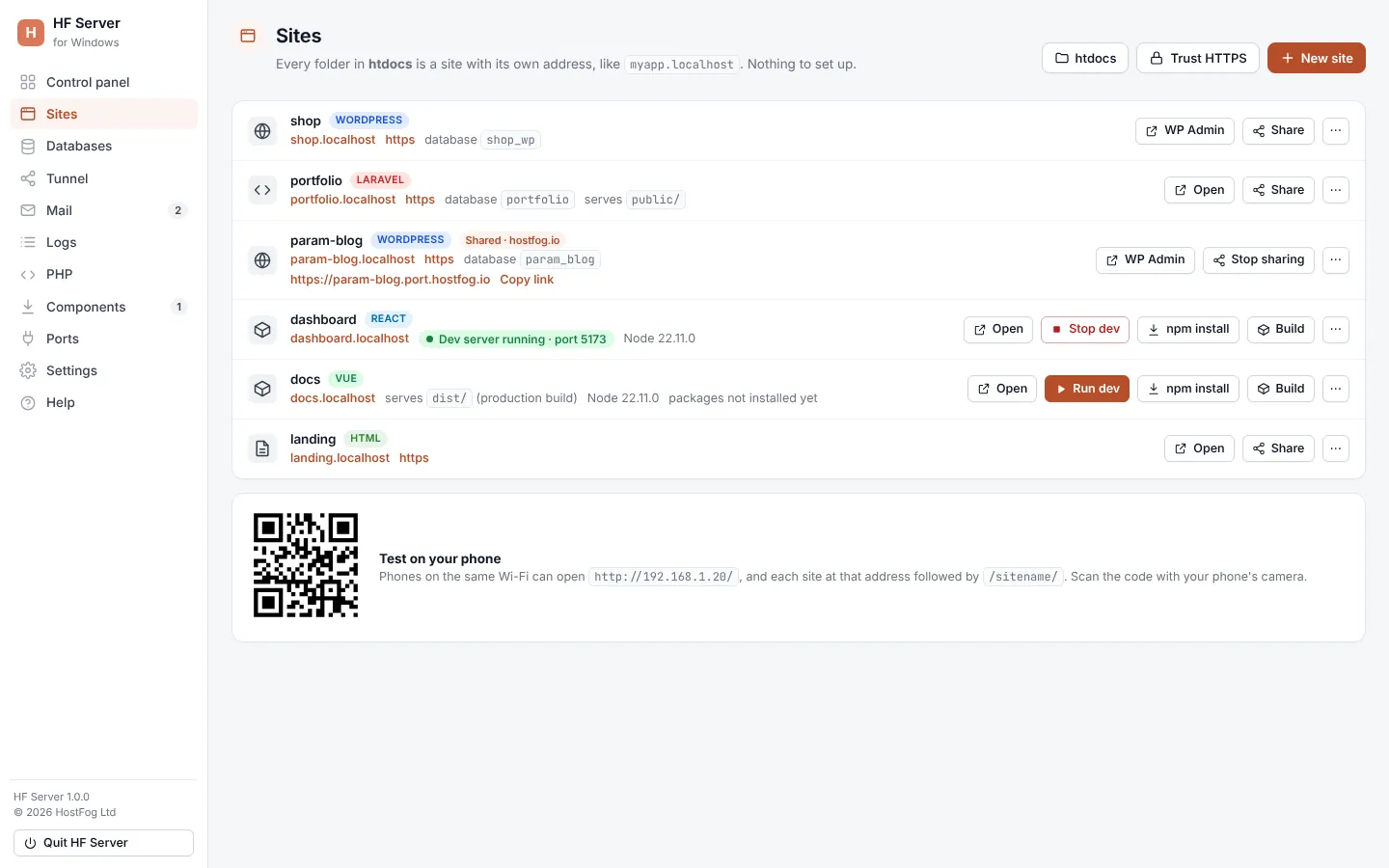
Every folder in htdocs is a site in HF Server, at its own name.localhost address. See how projects are recognised and run JavaScript dev servers.
Every folder in htdocs is a site with its own address, like myapp.localhost. There is nothing to set up: make a
folder, and within a few seconds it works.
Where: HF Server › Sites
Addresses
| Folder | Opens at |
|---|---|
htdocs/shop |
http://shop.localhost (and https://shop.localhost) |
htdocs/shop |
http://localhost/shop |
Browsers send every *.localhost address to your own computer by themselves. The address part comes from the folder
name: lower case, other characters become dashes, up to 50 characters. Folders starting with . are skipped.
When Apache doesn't use port 80 (on Linux it uses 8080), add the port: http://shop.localhost:8080. When Nginx runs,
each site also has an nginx link on Nginx's port.
Tip: to use
name.testaddresses instead, choose name.test in Settings and click Update hosts file on the Sites page. Your computer asks for permission to change its hosts file..localhostworks with no setup;.testworks in every program.
What kind of site it is
HF Server looks at the files in each folder and labels the site:
| Label | Recognised by | Served from |
|---|---|---|
| WordPress | WordPress files | the folder |
| Laravel | a Laravel project | public/ |
| Symfony | a Symfony project | public/ |
| PHP | Composer projects with public/, web/ (Drupal, Yii) or webroot/ (CakePHP) |
that folder |
| PHP | .php files |
the folder |
| React, Next.js, Vue, Nuxt, Svelte, Vite, Node.js | a package.json and its dependencies |
the dev server, or the built files |
| static | .html files |
the folder |
| Empty | nothing yet | — |
For WordPress sites the main button is WP Admin, which opens /wp-admin/.
Site buttons
| Button | What it does |
|---|---|
| Open | opens the site in your browser (Apache must be running) |
| Share / Stop sharing | gives the site a public link, or stops it (see Sharing a site) |
| ⋯ › Open folder | opens the site's folder |
| ⋯ › Back up | saves a backup of the site (see the activity log) |
| ⋯ › Delete… | deletes the site after you confirm |
Note: Delete… moves the folder to
backups/deleted, so you can get it back.
A shared site shows Shared and its public link, with Copy link.
JavaScript projects
Any folder in htdocs with a package.json is a JavaScript project. HF Server needs Node.js
for it; the row shows the Node version, or Node.js not installed.
| Button | What it does |
|---|---|
| npm install | installs the project's packages (shown while packages not installed yet) |
| Run dev | starts the project's dev server; the site's address shows it, with hot reload |
| Stop dev | stops the dev server |
| Build | runs the project's build |
While the dev server runs, the row shows Dev server running · port n, and Apache and Nginx send the site's address
to it. When it isn't running, the built files (dist/, build/ or out/) are served if there are any; otherwise a
page says the dev server isn't running. npm's output goes to logs/dev-<site>.log and important lines to the activity
log.
Security
.git folders and .env files are never served. Visitors who come through a shared link can't reach phpMyAdmin,
phpinfo() or the list of your local sites.