 HF Panel
Handlers & MIME types
Decide how the web server treats file types per website — run as PHP, show as text, download, or set a MIME type.
The Handlers & MIME types screen decides how the web server treats file types on a website — for example run
.html files as PHP, or send .webmanifest files with the right type. Changes work straight away.
Where: Control Panel › Software › Handlers & MIME types
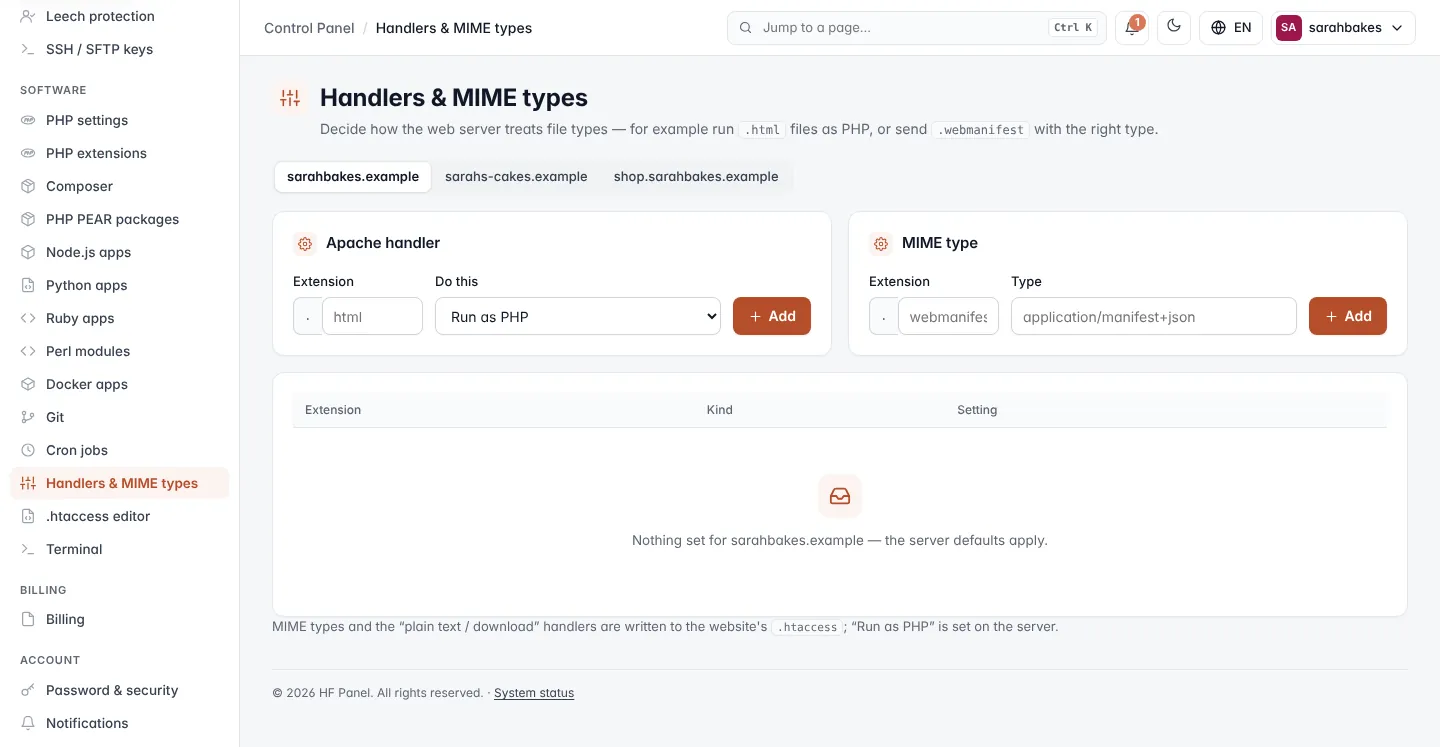
Add an Apache handler
- Pick the website at the top.
- Under Apache handler, enter the Extension without the dot, for example
html. - Choose Do this: Run as PHP, Show as plain text or Always download.
- Click Add.
Note:
.phpfiles always run as PHP, and.phtmlcannot be set to Run as PHP either.
Add a MIME type
- Under MIME type, enter the Extension, for example
webmanifest. - Enter the Type, for example
application/manifest+json. - Click Add.
| Field | Rules |
|---|---|
| Extension | 1–10 lowercase letters or numbers, without the dot |
| Type | looks like text/plain or application/x-foo |
Adding a rule for an extension that already has one of the same kind replaces it.
Your rules
The table lists each Extension, its Kind (Handler or MIME type) and its Setting. Click Remove to delete a rule. Without rules, the server defaults apply.
MIME types and the Show as plain text / Always download handlers are written to the website's .htaccess;
Run as PHP is set on the server.
Note: rules written to
.htaccessneed the Nginx + Apache web server, chosen on PHP settings.