 HF Panel
DNS cluster
Run your nameservers on more than one machine by letting secondary nameservers copy every DNS zone from this server.
The DNS cluster screen lets you run your nameservers on more than one machine. Secondary nameservers copy every DNS zone from this server and keep answering if this server is down, so websites on other servers and email stay reachable. New domains appear on the secondaries automatically.
Where: Server Admin › Hosting › DNS cluster
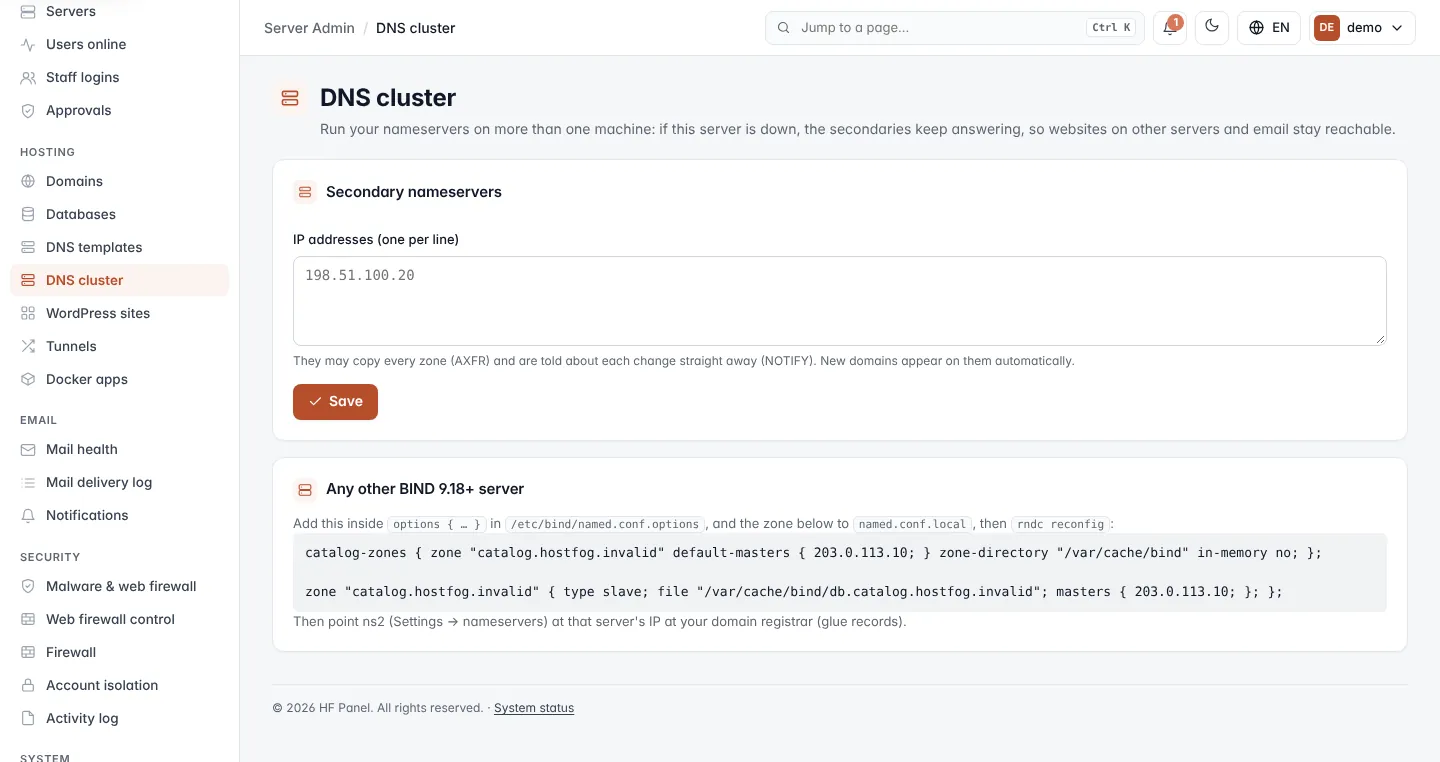
Zones are copied with zone transfers (AXFR). Each secondary is told about every change straight away (NOTIFY), and follows a catalog zone, so it learns about new and removed domains without any extra set-up.
Allow secondary nameservers
- Under Secondary nameservers, type the IP addresses of the secondaries in IP addresses (one per line). You can also separate them with spaces or commas.
- Click Save.
Only the listed addresses may copy the zones. IPv4 and IPv6 addresses are accepted. To stop all secondaries, empty the box and save.
After saving, set up each secondary as described below if you have not done so already.
Check the status
When secondaries are listed, a table shows each one:
| Status | Meaning |
|---|---|
| In sync | The secondary answers and has the catalog zone. The catalog serial it has is shown next to it. |
| Not answering yet | The secondary cannot be reached or has not copied the zones yet. |
Use one of your servers
If you have added other servers to HF Panel, they are listed under Use one of your servers.
- Click Make secondary next to the server.
HF Panel sets up BIND on that server as a secondary of this one and adds its IP address to the allowed list. It then copies every zone from this server and stays up to date.
Use any other BIND server
Any server running BIND 9.18 or later can be a secondary. The card Any other BIND 9.18+ server shows the exact configuration for your server:
- Add the
catalog-zones { … }line insideoptions { … }in/etc/bind/named.conf.options. - Add the
zone "catalog.hostfog.invalid" { … }block tonamed.conf.local. - Run
rndc reconfig. - Add the secondary's IP address on this screen and click Save.
The snippet already contains this server's IP address as the primary.
Point your second nameserver at the secondary
Set the second nameserver (ns2) in Settings and create its glue record at your domain registrar with the secondary's IP address. Customers' domains then use both machines.
Tip: put the secondary in a different data centre from this server, so one outage cannot take both nameservers down.