 HF Panel
Ports
See which programs listen on which ports of your computer in HF Server, to solve "port already in use" problems.
The Ports page lists the programs listening for connections on your computer. Two programs can't share one port, so this is where you find out what is in the way when a server won't start.
Where: HF Server › Ports
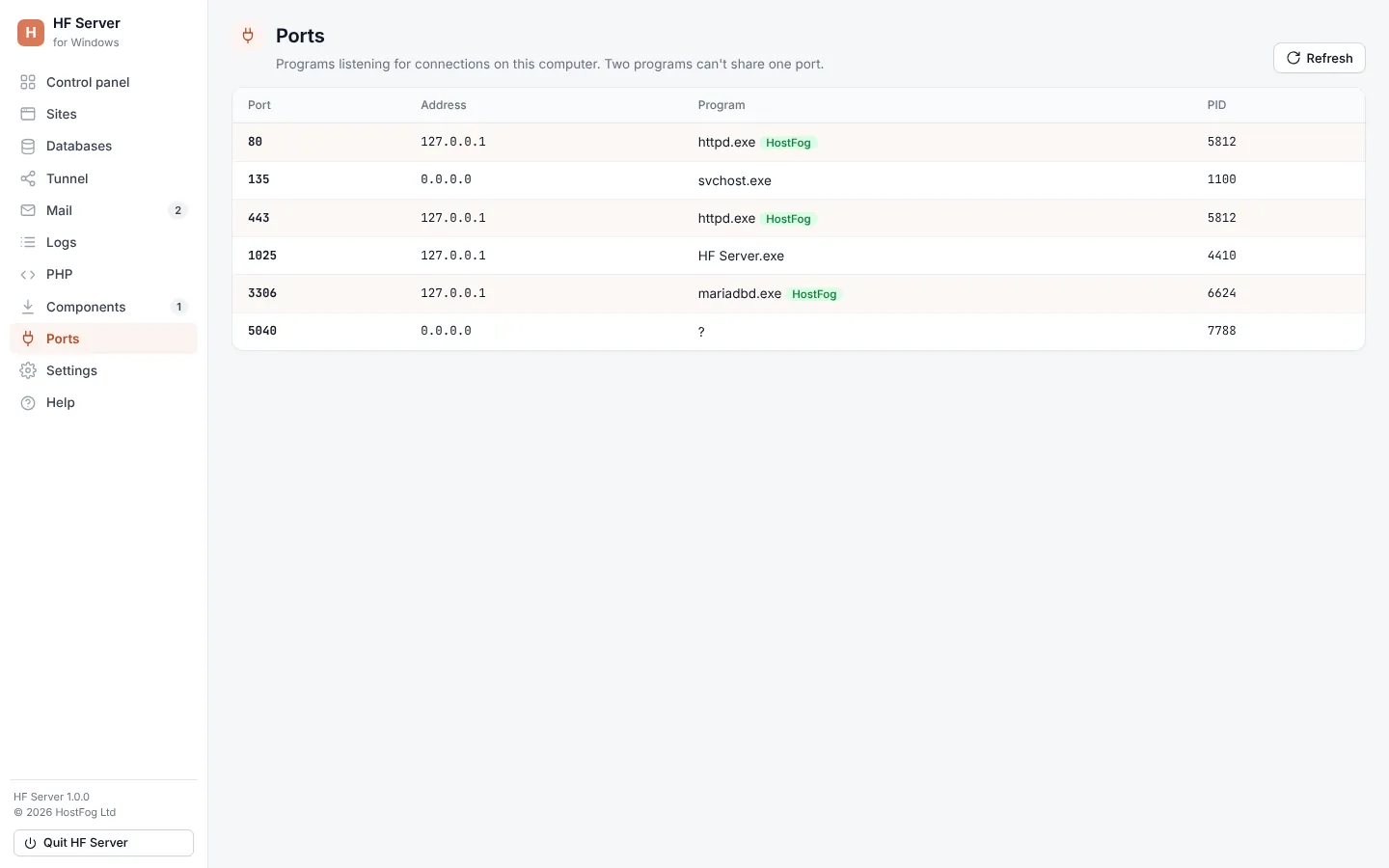
The list
| Column | What it shows |
|---|---|
| Port | the port number |
| Address | the address it listens on (127.0.0.1 = this computer only) |
| Program | the program's name; HF Server's own servers are marked HostFog |
| PID | the program's process ID |
Click Refresh to read the list again.
Ports HF Server uses
| Server | Default port |
|---|---|
| Apache | 80 (8080 on Linux) |
| Apache HTTPS | 443 (8443 on Linux) |
| Nginx | 8081 |
| Nginx HTTPS | 8444 |
| MySQL | 3306 |
| PostgreSQL | 5432 |
| Redis | 6379 |
| Mail catcher (SMTP) | 1025 |
Change any of them in Settings. Restart a server to use its new port.
Tip: "Port 80 is already in use" usually means another web server or program has it. Close it, or set Apache to 8080 and open
http://localhost:8080.